


This is a follow-up from our Accessing the U-Boot environment from a C program blog post.
🌳Need to protect the environment
When you’re trying to harden an embedded Linux device to make it more resistant to attacks, one key part to secure is the bootloader, because that’s the part that boots the operating system. Even you implement a secure boot chain, if an attacker manages to interrupt the boot process and get access to the bootloader shell, this attacker would be able to load and run her/his own payload on the device.
Here, let’s talk about Das U-Boot, which is the most popular bootloader in embedded systems. Barebox is an another bootloader that deserves our interest too, but I hope to cover it later.
In U-Boot, what is called the environment is a critical part in terms of security, as it defines:
- The sequence of commands that are run at boot time (
bootcmdvariable) - The command line parameters that are passed to the operating system kernel (
bootargsvariable) - The time left to an operator to access the U-Boot shell before the OS is started (
bootdelayvariable) - And a few others that we will see in the example we share.
Making the U-Boot environment entirely read-only?
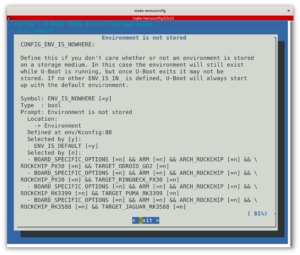
It’s entirely possible to make the U-Boot environment totally read-only. I would typically do this by making U-Boot use a default environment, built from its source code and therefore frozen at compile time.
This way, the environment itself is part of the secure boot chain. It’s loaded and verified (through a cryptographic signature) by the CPU at power-on time.
In a demo system, this may work, but in a real-life scenario, it’s frequent to store variable information in the U-Boot environment, such as:
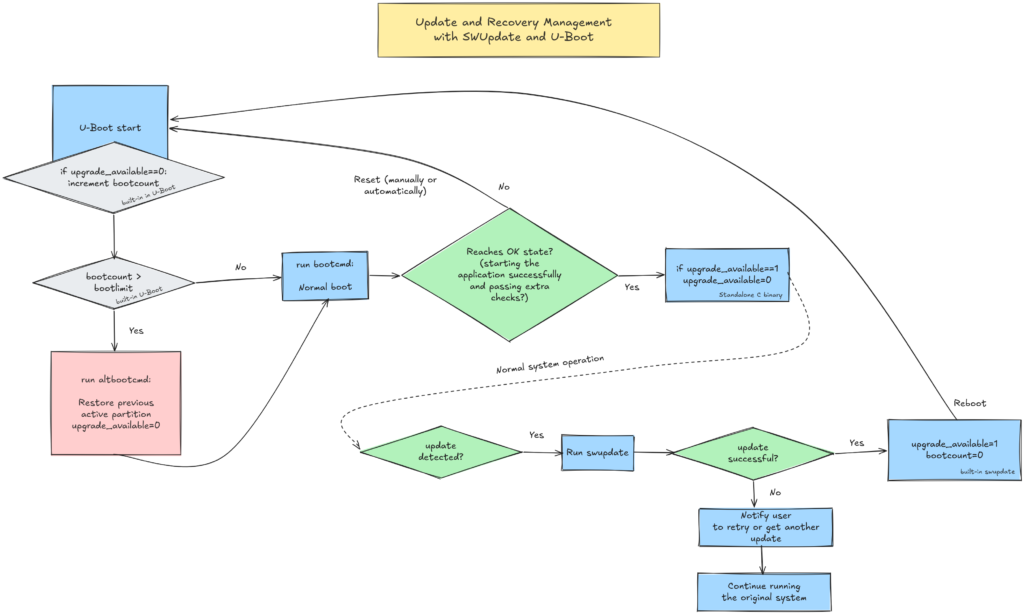
- Which is the active root partition when your system relies on A/B updates,
- Whether a new update is available (
upgrade_availablevariable), - How many times a new update has been booted (
bootcountvariable). When this number exceeds a given limit (bootlimitvariable), this can be used to run a command (altbootcmdvariable) to switch back to the previously used root filesystem.
It may be possible to store such variable information in some secure storage, but it’s much easier to use the U-Boot environment!
Making specific variables read-only
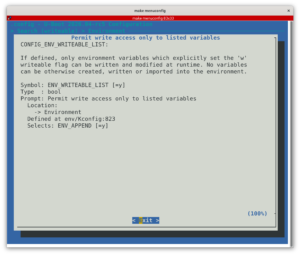
Fortunately, U-Boot offers a configuration setting (CONFIG_ENV_WRITEABLE_LIST) to specify which variables should be writable. Here’s how I used it on a customer project based on the Toradex Verdin iMX8M Mini System on Module.
First, in U-Boot’s configuration interface (make menuconfig), enable CONFIG_ENV_WRITEABLE_LIST.
Then, add these lines to the board.h file corresponding to your board, in my case include/configs/verdin-imx8mm.h:
#ifdef CONFIG_ENV_WRITEABLE_LIST
#define CFG_ENV_FLAGS_LIST_STATIC \
 "bootlimit:dr,bootcmd:sr,altbootcmd:sr,bootcount:dw,bootpart:dw,upgrade_available:dw"
#endif
In the above code, you see a list of <variable>:<type><access mode> statements:
dmeans an integer typesmeans a string typermeans read-onlywmeans read-write
You’ll find more options and details in U-Boot’s README file.
Last but not least, you also have to tweak the same board.h file to set the default values for variables, which is absolutely necessary for the read-only ones:
/* Initial environment variables */
#define CFG_EXTRA_ENV_SETTINGS \
	BOOTENV \
	MEM_LAYOUT_ENV_SETTINGS \
	"bootpart=2\0" \
	"bootlimit=3\0" \
	"altbootcmd=echo UPGRADE FAILED - RESTORING PREVIOUS VERSION; setenv bootcount 1; setenv upgrade_available 0; if test \"${bootpart}\" = \"2\"; then setenv bootpart 3; else setenv bootpart 2; fi; saveenv; run bootcmd \0" \
	"bootcmd=setenv bootargs root=/dev/mmcblk0p${bootpart} console=ttymxc0; load mmc 0:1 40000000 boot-${bootpart}/fitImage; bootm 40000000\0"
As a side note, here you can see that the kernel command line (bootargs) is not declared as read-only, but the value passed to the kernel is hard-coded into bootcmd anyway, ignoring the value from the environment. In my particular project, additional kernel command line settings are built into the kernel using the bootconfig feature.
In you’re curious, all this enabled the implementation of the below update and recovery flow:
Things to know and remember
Experimenting with this implementation made me learn or realize a few important details:
- It’s not enough to declare the read-only variables. You also need to explicit the read-write ones. Otherwise, U-Boot well let you define random variables, and even save them (
saveenvcommand), but those won’t be accessible after a reboot. - This mechanism is only enforced in U-Boot. You can still modify a read-only variable from Linux (typically using the
fw_printenvandfw_setenvcommands from libubootenv), but U-Boot will then ignore the value loaded from its environment, and will stick to the default one. So, in Linux, don’t take what you read fromfw_printenvfrom granted!
All this considered, an attack vector remains possible. An attacker gaining sufficient privileges may be able to modify some of the read-write variables, and could trigger the execution of the inactive A and B partition. However, the potential damage is limited because this person still won’t be able to modify the boot sequence or the kernel command line.
If you need help implementing such mechanisms or more generally to harden your embedded Linux systems, don’t hesitate to contact us.
Related links
- Michael Opdenacker: Implementing A/B updates with U-Boot (bootlin.com)
- Esa Jääskelä: Protecting U-Boot Command Line (ejaaskel.dev)